 / blog
pg_statviz 1.2 released with PostgreSQL 19 support and new features
Just in time for the PostgreSQL 19 betas, I'm excited to announce release 1.2 of pg_statviz, the minimalist extension and utility pair for time series analysis and visualization of PostgreSQL internal statistics.
This release adds support for the upcoming PostgreSQL 19:
pg_statviznow captures the newwal_fpi_bytescounter frompg_stat_wal.- The PG18/19 I/O worker, effective WAL level, and autovacuum scoring settings are captured in
snapshot_conf. - The release has been tested against 19 beta3, and across the whole PostgreSQL 13 to 19 range.
It also introduces a new blocking locks analysis module:
- Each snapshot now records the number of blocked and blocking sessions, along with a breakdown by lock type (
relation,transactionid,tuple, and so on). - Detection is built on
pg_blocking_pids(), so even soft blocks (sessions that are just ahead in the lock wait queue) are counted, not just hard conflicts. - Storage stays lightweight: table size is independent of how many sessions were involved in the blocking.
- The module produces charts and AI verdicts like every other module, and the deterministic severity floor applies here too: sustained blocking can never be reported as healthy.
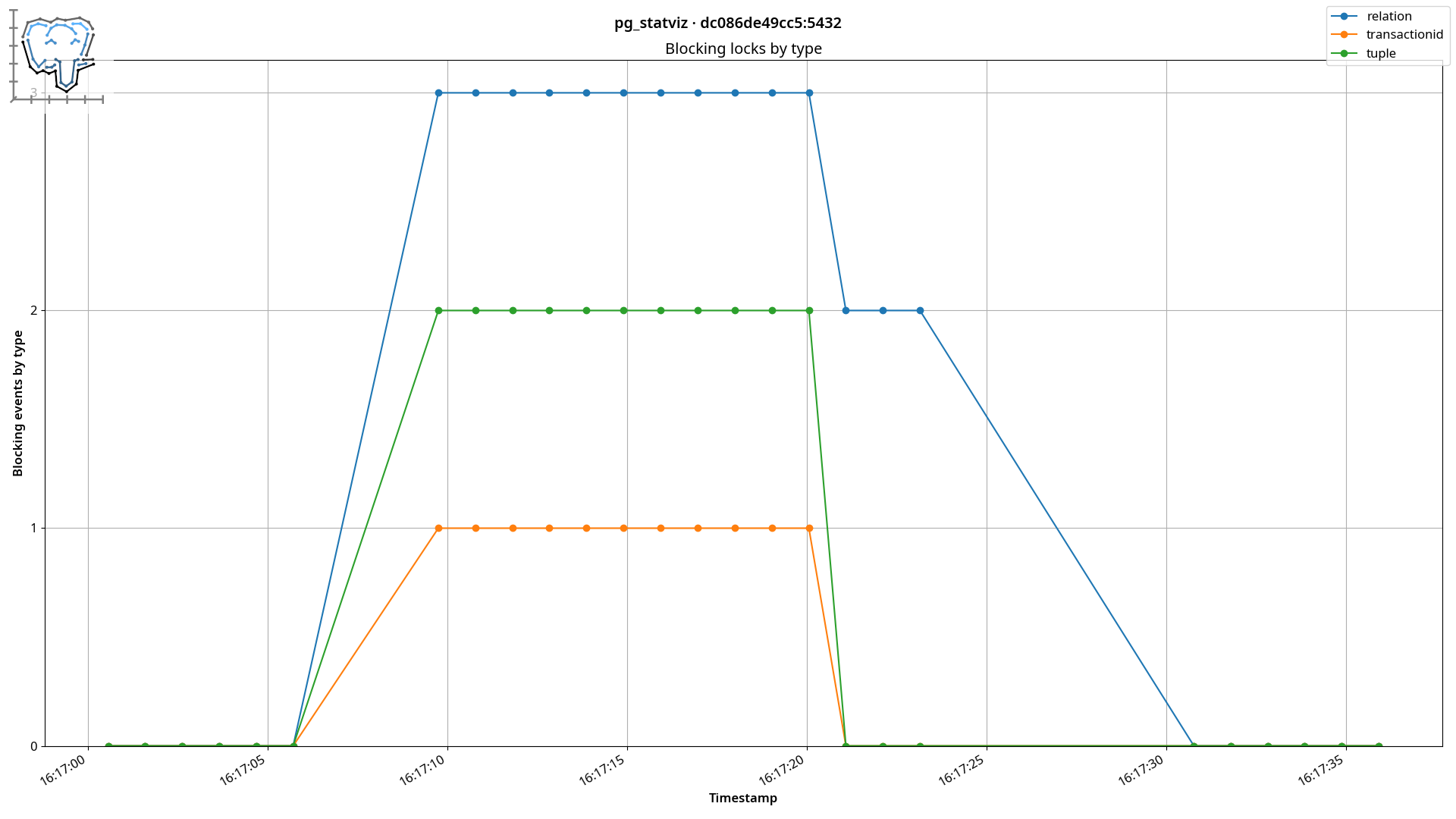
Blocking locks by type, as captured by the new blocking module (click to enlarge).
Also new is the openai AI provider:
--ai openaiuses the OpenAI API, so the same flag works with OpenAI itself and with any other service or local server that implements that API.- You can select the endpoint and model with the
OPENAI_BASE_URLandOPENAI_MODELenvironment variables. - The
openaipackage has been added to the[ai]extras, and zero-dependency installs remain unchanged.
Finally, this release also updates the default AI models to claude-sonnet-5 for Claude and gemini-3.7-flash for Gemini.
pg_statviz takes the view that everything should be light and minimal. Unlike commercial monitoring platforms, it doesn't require invasive agents or open connections to the database: it all lives inside your database.
The extension is plain SQL and PL/pgSQL and doesn't require modules to be loaded, the visualization utility is separate and can be run from anywhere, and your data is free and easy to export. The AI analysis remains fully optional and opt-in: if you don't pass --ai, pg_statviz behaves exactly as before, with no extra dependencies and no calls to anything outside your machine.
- You can download and install
pg_statvizfrom the PostgreSQL repositories or PGXN. - The utility can also be installed from PyPi; for the AI features use
pip install pg_statviz[ai]. - Manual installation is also possible.